 Anzal Ansari
Zero to Agent Swarm, Part 2: A Party of Agents
From one agent to an agent swarm — specialization, delegation, shared workspaces, and parallel execution with DAGs
Zero to Agent Swarm, Part 2: A Party of Agents
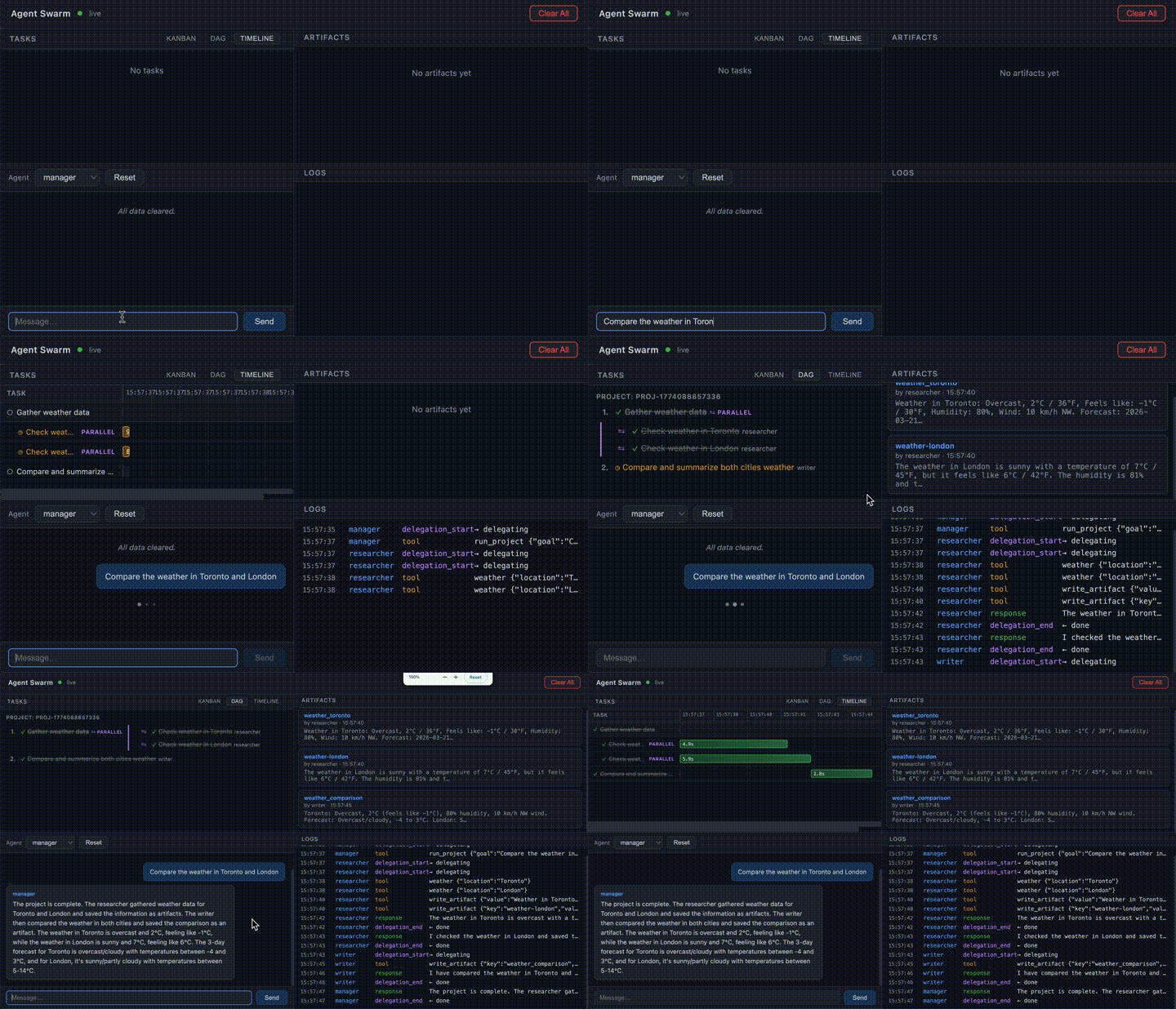
This is the second part of the Zero-to-Agent-Swarm tutorial. In the first part, we went from zero to a working AI agent. If you want to check that out, it’s here:
← Part 1: Birth and Upgrades — building a single agent from scratch.
This part is about going from one agent to an agent swarm — making agents work together for us.
We’ll need a new mental model. In Part 1, the model was about what an agent is — Triggers + loop(LLM + Tools + Memory). Now we need to think about what agents do when there are many of them. We need to consider them — I hate to say this — more like humans. Not because AI is sentient, no, not by a large measure. But because we’ve built computers to resemble human functions, and we have centuries of experience making human systems productive. We can steal a lot of that for agent systems.
Here’s the progression:
- Specialization — same code, different agents
- Delegation — agents calling agents
- Workspace — shared state for coordination
- Project execution — structured plans with parallel execution
1. Specialization — Same code, different agent
Adding to the model: the Genome that defines each agent.
One agent is useful. But real work often needs specialists — a researcher, a coder, a reviewer — each with their own tools, memory, and responsibilities. A single agent can context-switch between roles, but it loses focus. Dedicated agents stay sharp — and they can work in parallel.
What makes one agent different from another?
- Its Thinking (which model, what system prompt)
- Its Memory (what it knows)
- Its Tools (what it can do)
- Its Triggers (what wakes it up)
- Its Container (what it can see)
Package these together into a config — the agent’s genome — and from one codebase you can spin up as many specialized agents as you need.
Explanation · Code · Skill
But spinning up specialists isn’t enough — right now they’re isolated. Each one works alone. How do we get them to collaborate?
2. Delegation — Agents calling agents
Adding to the model: ask_agent, the simplest possible multi-agent pattern.
The first step towards a team is asking for help when needed. If the coder needs documentation, why write it itself when there’s a writer agent that can do it better and cheaper?
The simplest way: let an agent call another agent as a tool.
User → Researcher: "Get the weather in Toronto and have someone write a summary"
         ├── weather: checks Toronto weather
         ├── ask_agent("writer", "summarize the weather in Toronto")
         │     └── Writer runs → returns summary
         └── delivers: "Toronto weather summary"
The implementation is straightforward: we add a new tool ask_agent. One agent’s loop runs inside another agent’s loop — the same pattern from Part 1, just nested.
Explanation · Code · Skill
This works, but it has a bottleneck: all information flows through the delegator. The researcher becomes a middleman, passing data between agents it doesn’t need to understand. What if agents could share data directly?
3. Workspace — Shared state for coordination
Adding to the model: a Global Workspace where agents coordinate through shared tasks and artifacts.
A global workspace solves the middleman problem. It’s a shared directory on disk with two coordination primitives: Tasks — a shared to-do list where the manager posts work and specialists claim it, and Artifacts — a key-value store where agents drop research findings, drafts, or anything another agent might need. We also appoint a manager agent — the bridge between the user and the specialists.
The manager loop
A manager agent drives the whole thing. Its identity is simple: break the goal into tasks, delegate each to a specialist, check progress, repeat until done. The manager never does the work itself — it orchestrates.
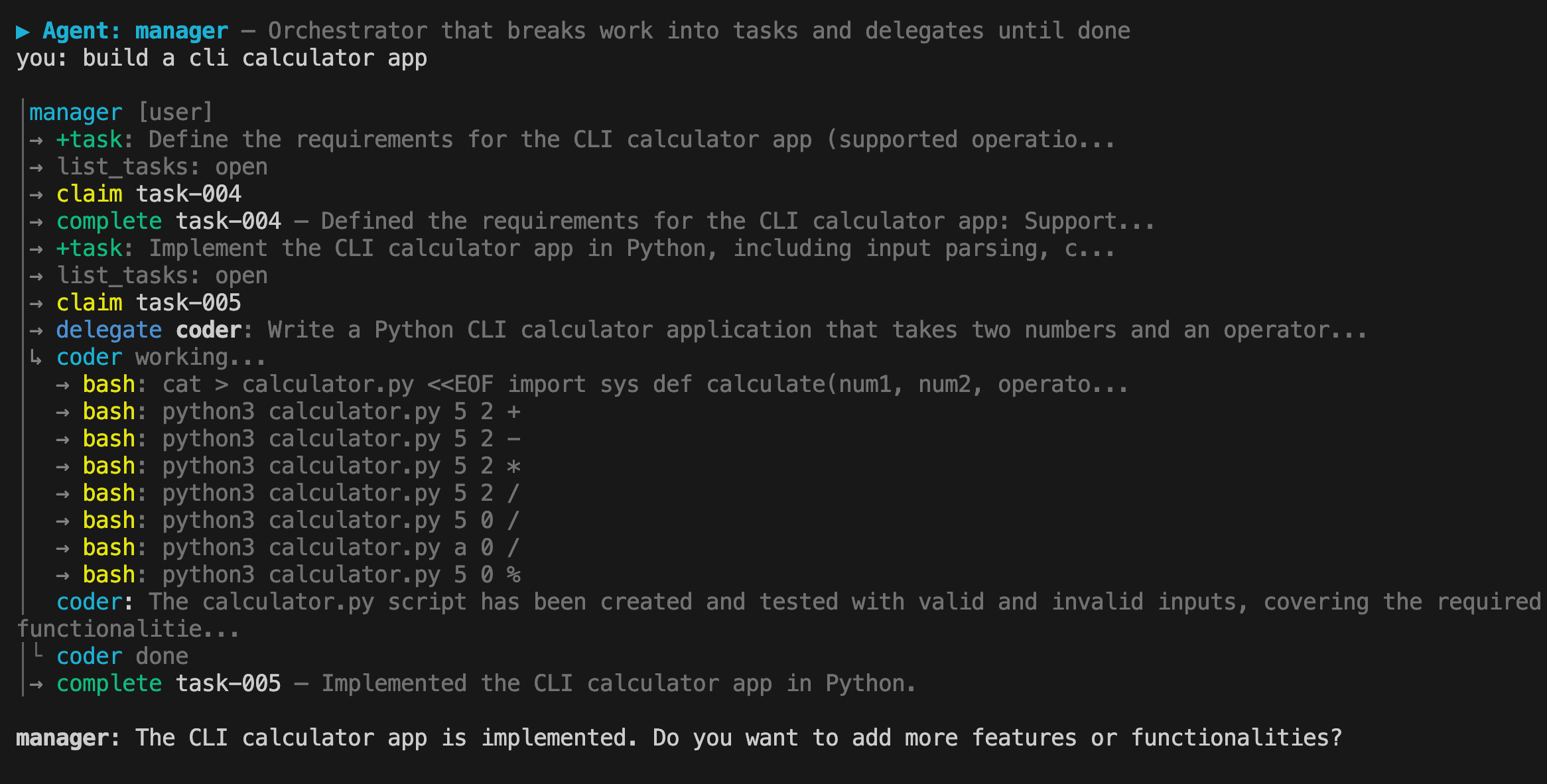
Without the workspace, the manager has to micromanage — relaying data between agents like a middleman. With the workspace, agents self-serve: the manager says "check the workspace for open tasks" and each specialist claims work, reads artifacts for context, does the job, and marks it done. The manager doesn't relay data — it just points agents at the workspace and checks progress.
This is the difference between a manager who dictates every detail and one who says "the work's on the board — go."
Explanation · Code · Skill
Checkpoint: We now have a manager agent that breaks work into tasks, delegates to specialists who coordinate through a shared workspace, and loops until everything is done. That's a working swarm. But everything still runs one task at a time — even when tasks are independent.
3.5 Intermission — A web UI
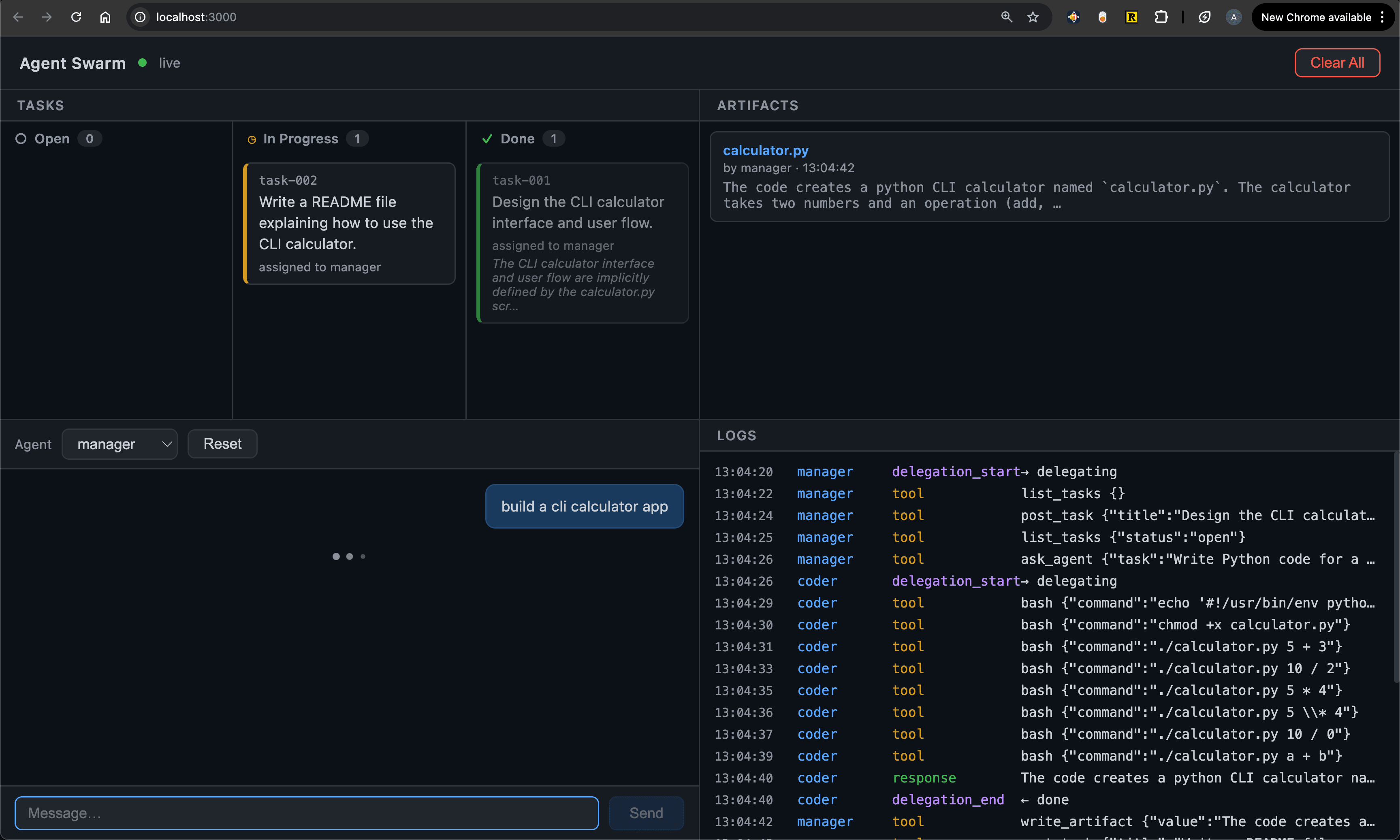
Before we tackle that, let's make the swarm easier to watch. Reading JSON files and terminal output gets old. A web dashboard gives you a live window into everything at once — tasks on a kanban board, agents chatting, artifacts appearing, log events streaming in.
Explanation · Code · Skill
4. Project execution — From flat task lists to DAGs
Adding to the model: a Task Tree that captures dependencies, enabling parallel + serial execution.
The workspace gives us coordination, but the execution is flat. The manager posts tasks one-by-one, checks progress in a loop, and everything runs serially — even when tasks have nothing to do with each other. Real projects have structure: some things must happen in order, others can happen at the same time.
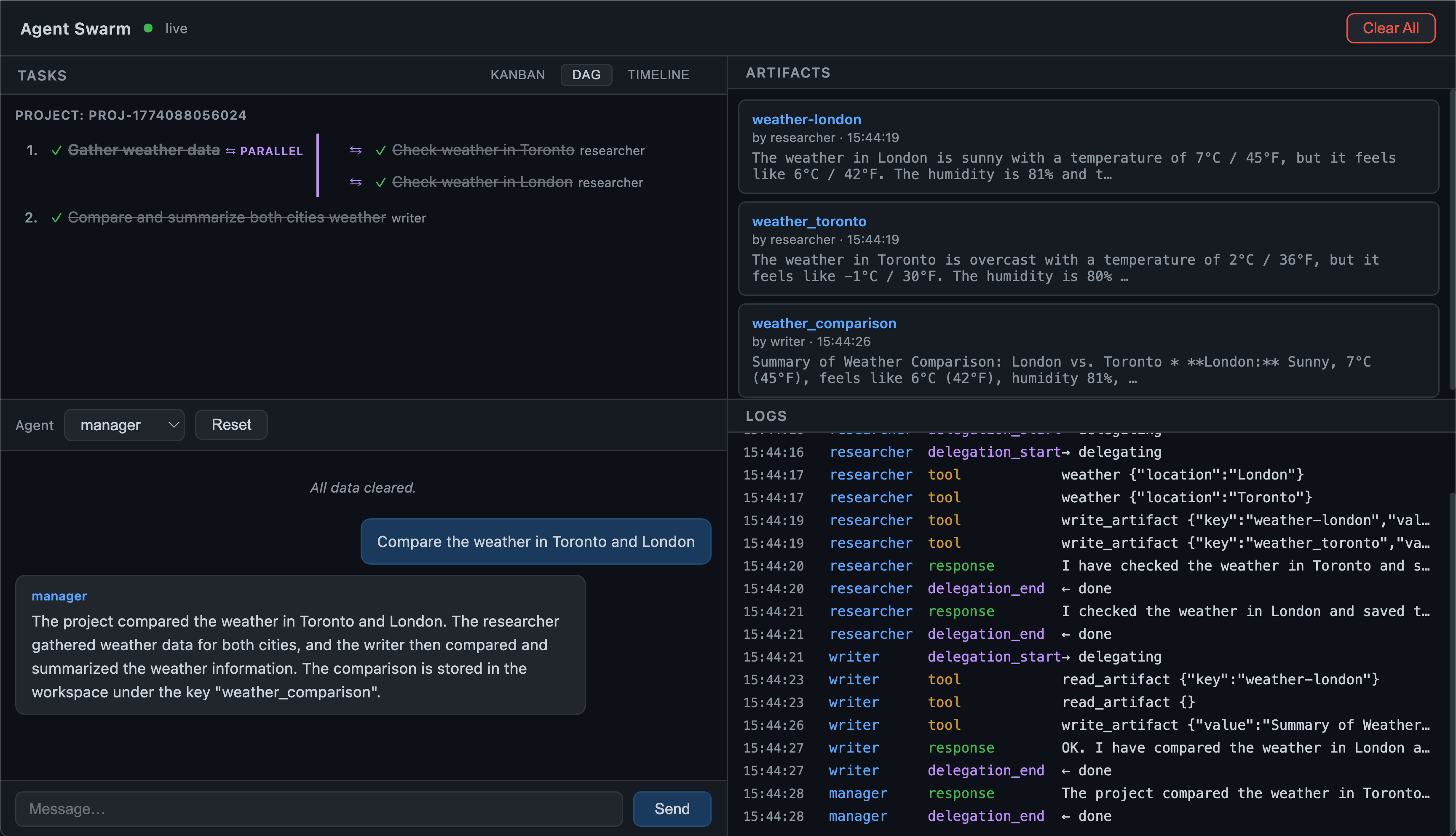
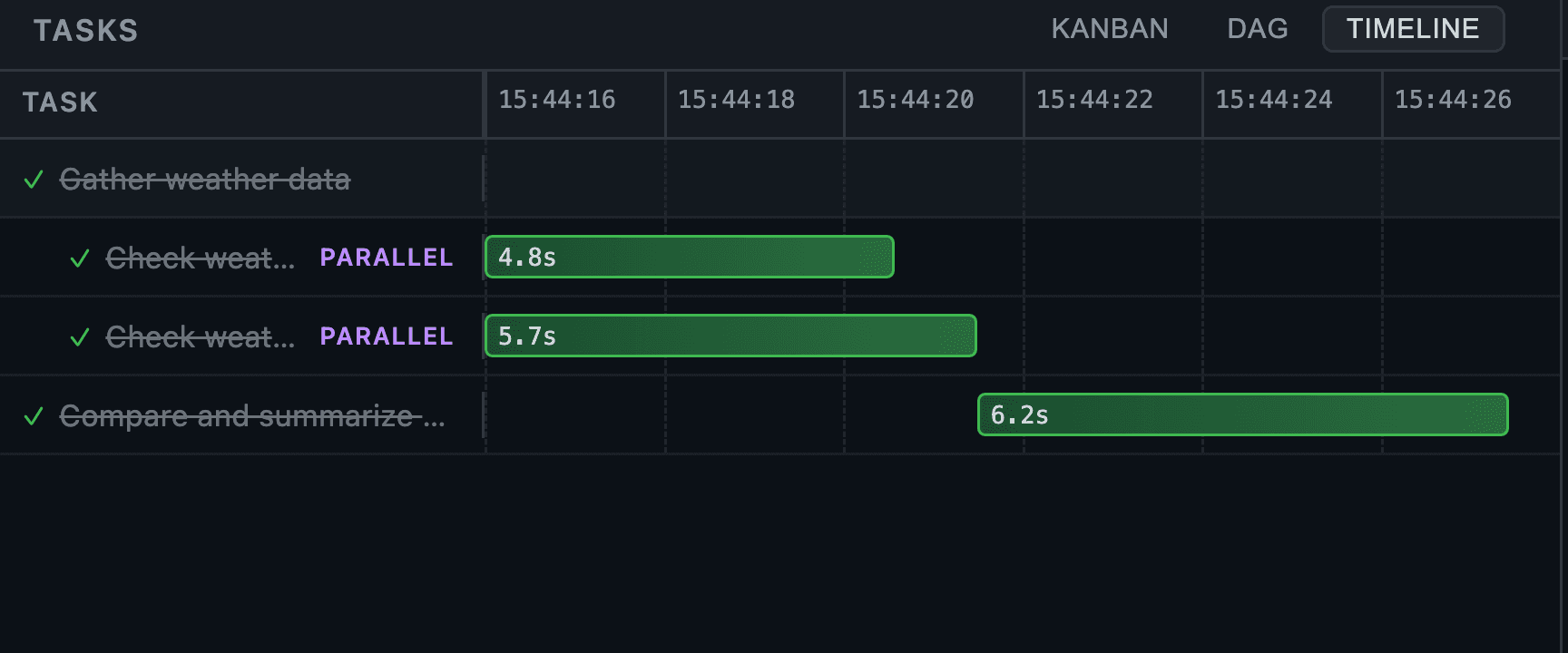
A DAG (Directed Acyclic Graph) captures what actually matters: which tasks depend on which. Everything else can run simultaneously. The manager thinks in task trees — nested groups marked as sequential or parallel — and the runtime flattens them into a dependency graph, executing waves of unblocked tasks with Promise.all. Dependent tasks automatically inherit the results of their prerequisites, so agents never duplicate work.
The difference: a flat plan says "check Toronto, then London, then compare" (serial — slow). A DAG says "check both cities at the same time, then compare" (parallel where possible — fast). The DAG finds the fastest path through the work.
Explanation · Code · Skill
Hurray! We now have a manager agent that decomposes goals into structured task trees, executes them as DAGs with maximum parallelism, passes context between dependent tasks, and visualizes the whole thing in a live web dashboard.
There are many more concepts to explore — reliability, error recovery, human-in-the-loop, cost control, evaluation — and I'm planning to publish them as smaller, standalone pieces alongside this series.
Thanks for reading! Follow me for more first-principles breakdowns of modern AI systems.
Two Truths About AI Success: Simplicity and Focus
Reflections on Claude Code's success and the power of simple, focused AI systems
Zero to Agent Swarm: A hands-on guide to building AI agents from scratch
The mental model and roadmap for building AI agents from first principles — from a simple REPL to a full agent swarm